

1 October, 2026
Google Search Console Gets a New Multimodal Filter: Here’s What It Means for SEO
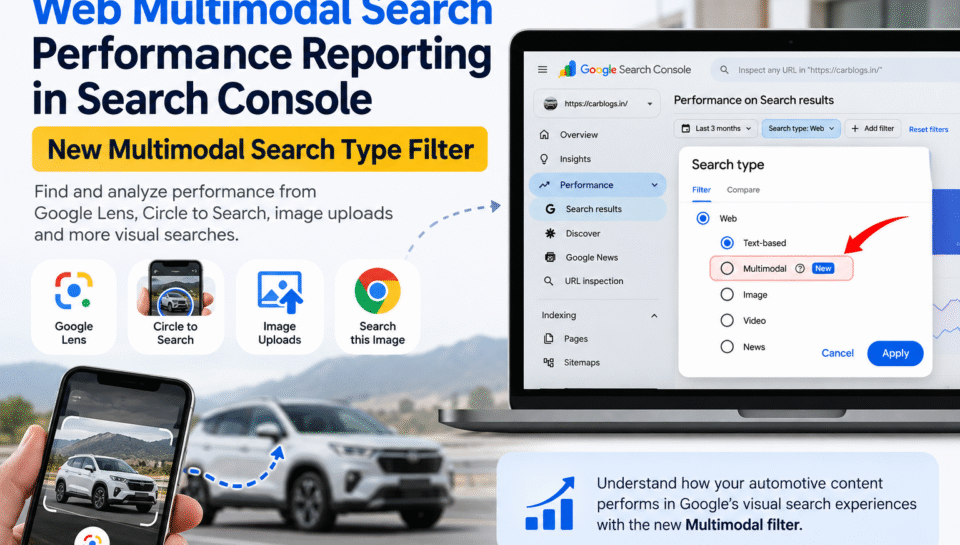
Google Search is becoming more visual, and website owners can now get more insight into this changing search behavior. Web multimodal Search performance reporting in Search Console lets eligible sites see performance data from searches that use visual inputs, including Google Lens, Circle to Search on Android, image uploads, and Chrome’s “Search this image” feature. For automotive websites like CarBlogs, this is especially relevant because car images, spy shots, specifications, comparisons, and vehicle listings are all highly visual forms of content.
What Is Web Multimodal Search?
Multimodal search is a way of searching that goes beyond a traditional text query. Instead of typing only keywords into Google, users can use an image, camera, screenshot, or another visual input to find information.
For example, a car enthusiast may see an unfamiliar SUV on the road, take a photograph, and use Google Lens to identify it. Another user may circle a particular alloy wheel design on their Android phone and search for similar information.
This is different from a normal text-based search such as:
“Upcoming SUVs in India 2026”
A multimodal search could start with a photograph of a test vehicle instead.
Google has introduced reporting for web multimodal searches in Search Console so publishers can better understand how their content performs when users search using images and other visual inputs.
Multimodal Search vs Text-Based Search
| Feature | Text-Based Search | Multimodal Search |
|---|---|---|
| Main input | Words or phrases | Images and visual inputs |
| Example | “Toyota 7 seater SUV” | Photo of an unknown SUV |
| Common use | Finding information | Identifying or exploring something visual |
| Important content | Text, pages, structured information | Images plus relevant page content |
| Measurement | Traditional Search Console reporting | Multimodal search reporting/filter |
For automotive websites, this distinction is important because many car-related searches naturally begin with something users can see.
Examples of Multimodal Search
Google’s current reporting includes data associated with several visual search experiences, including:
- Google Lens
- Circle to Search on Android
- Image uploads to Google Search
- Chrome’s “Search this image” feature
These experiences can be useful when users want to identify a car, understand a design element, find similar images, or discover more information about something they have photographed.
What Is the Google Search Console Multimodal Search Type Filter?
The Google Search Console Multimodal Search Type Filter is a new filtering option within Google’s performance reporting.
Google introduced web multimodal reporting on September 24, 2026. The company says the data is available in the Search results performance report as well as the report for Generative AI features. The new filter allows site owners to isolate multimodal search performance from the wider data set.
If a website receives traffic from these searches, the relevant metrics can begin appearing in its Performance report.
This gives publishers another way to understand how users discover their content.
What Data Can You Analyze?
The exact data available can depend on the report and search experience, but Search Console’s Performance reports are designed around metrics such as:
- Clicks
- Impressions
- Click-through rate
- Position
- Search-related performance trends
The useful part is not simply looking at one number. Instead, compare multimodal activity with your normal search performance and look for changes over time.
For example, suppose a CarBlogs article about a new SUV contains original spy shot images and detailed specifications. If that page starts receiving visibility from visual searches, the new reporting can provide another signal that users are discovering the page through visual search behavior.
Which Google Search Experiences Are Included?
Google says its web multimodal reporting includes searches performed through several visual experiences.
| Experience | How Users Search | Automotive Example |
|---|---|---|
| Google Lens | Search using a camera or image | Identify an unfamiliar SUV |
| Circle to Search | Search a selected part of a screen on Android | Identify a car’s headlamp or alloy wheel |
| Image Upload | Upload an image to Google Search | Find information about a photographed vehicle |
| Search this image | Search an image from Chrome | Find related information about a car image |
Google Lens and Car Search
Google Lens is particularly relevant to automotive publishers because vehicles are highly visual.
Consider someone spotting a camouflaged test vehicle. Instead of searching:
“new Mahindra SUV spy shots”
they may photograph the vehicle and use a visual search tool.
If CarBlogs has a detailed article containing relevant images, specifications, expected launch information, or comparisons, that page may be useful to the user during their research journey.
This does not mean every image will automatically generate traffic. The important lesson is that visual content can be another discovery pathway, and Search Console now provides more visibility into that behavior.
How to Find Multimodal Search Data in Google Search Console
If your website receives relevant traffic, you can use the new reporting to examine its performance.
Step 1: Open Your Search Console Property
Sign in to Google Search Console and select the website property you want to analyze.
For CarBlogs, this would mean selecting the verified CarBlogs property.
Step 2: Open the Performance Report
Go to the Performance area and open the relevant Search results performance report.
This is where you normally analyze your site’s Google Search visibility.
Step 3: Apply the Multimodal Search Type Filter
Look for the new multimodal search type filtering option in the Performance report.
Applying the filter allows you to focus on the data associated with multimodal searches rather than viewing the broader search data together.
Step 4: Compare the Results
Do not stop after checking the total number of clicks.
Compare:
- Multimodal search performance over different periods
- Pages receiving visibility
- Click and impression trends
- Multimodal activity against traditional search activity
- Performance after publishing or updating important visual content
Google also provides an Export option, allowing the reported data to be downloaded and analyzed in other tools.
How to Analyze the Search Console Performance Report
The new reporting becomes more useful when treated as part of a broader SEO analysis rather than as a standalone metric.
Look for Click and Impression Trends
A rise in impressions can indicate that your content is being surfaced more often through the relevant search experiences.
Clicks tell you something different. They indicate whether users are actually visiting your website after seeing that content.
For example, if a CarBlogs article about a new SUV has increasing visual search impressions but very few clicks, it may be worth reviewing the page’s:
- Title
- Introduction
- Image relevance
- Content depth
- Internal links
- Overall usefulness
The data itself does not automatically tell you why performance changed, so it should be combined with page-level analysis.
Compare Multimodal and Text-Based Search
A useful comparison is:
| Search Type | Question to Ask |
|---|---|
| Text search | Which topics are bringing users to the page? |
| Multimodal search | Which visual content is helping users discover it? |
| Both | Is the page useful across different discovery methods? |
For example, a Toyota SUV article may attract traditional searches for “Toyota Hyryder price” while its photographs and visual information may also support users researching the vehicle visually.
Identify Pages With Strong Visual Search Potential
On CarBlogs, pages with strong visual potential include:
- New car launch articles
- Spy shot reports
- Car reviews
- Bike reviews
- Vehicle comparison articles
- Specification guides
- Exterior design articles
- Interior feature articles
- Upcoming vehicle articles
- Car and bike listings
A good example is an article such as 2026 Honda Elevate Hybrid, Price, Mileage, Facelift Updates & Full Specifications, which combines vehicle imagery with detailed specifications, expected features, pricing and comparison information.
Likewise, articles about vehicles such as the Toyota Hyryder 7 Seater naturally lend themselves to visual research because readers want to understand the vehicle’s design, size, seating arrangement and differences from existing models.
Look Beyond Traffic
Multimodal reporting should not be treated simply as another traffic source.
It can help you understand:
- How users discover visual automotive content
- Which pages have visual search potential
- Whether important images are supporting content discovery
- Which topics deserve additional visual coverage
- How search behavior is changing over time
What Does Multimodal Search Mean for Automotive SEO?
Multimodal search does not mean that traditional SEO is no longer important.
Instead, automotive publishers have another reason to make their pages useful for both visual and text-based discovery.
Optimize Images for Search and Users
Important vehicle images should be:
- Relevant to the article
- High quality
- Properly sized
- Described accurately
- Supported by useful surrounding content
- Optimized for a fast-loading page
Avoid treating image optimization as simply adding keywords to an image’s alt text.
For example, if an image shows the front design of an upcoming SUV, the surrounding article should explain what readers are actually looking at.
Strengthen the Page Around the Image
A good automotive image works better when it is supported by useful information.
A vehicle image can be followed by sections covering:
- Design
- Dimensions
- Engine
- Features
- Safety
- Expected price
- Launch timeline
- Rivals
This is already a natural format for CarBlogs’ detailed vehicle articles.
For example, CarBlogs’ Honda Elevate Hybrid article combines exterior and interior updates with engine details, mileage, specifications, variants, pricing, competitors and FAQs.
That kind of structure gives readers much more value than a page containing photographs alone.
Create Content That Answers Visual Search Needs
Think about what someone wants to know after seeing a vehicle.
They may ask:
- What car is this?
- Which model is it?
- Is this the new facelift?
- When will it launch in India?
- What are its expected features?
- How much will it cost?
- Which cars will compete with it?
- Is it a 5 seater or 7 seater?
- What engine will it use?
A strong article should answer those questions rather than forcing the reader to visit multiple pages.
Multimodal Search vs Traditional Search Reporting
The two approaches should complement each other.
| Area | Traditional Search | Multimodal Search |
|---|---|---|
| Starting point | Keyword/query | Image or visual input |
| Automotive example | “Best SUVs under ₹20 lakh” | Photo of an unfamiliar SUV |
| Content opportunity | Detailed written guide | Images + detailed written context |
| Useful page types | Guides, reviews, comparisons | Reviews, spy shots, listings, visual explainers |
| SEO focus | Topic relevance and useful content | Visual relevance combined with useful content |
| Measurement | Standard Search Console data | Multimodal-filtered performance data |
For CarBlogs, there is no reason to choose one over the other.
A detailed vehicle page can target conventional searches while also providing the images and context needed for visual discovery.
7 Ways to Prepare Your Car Website for Multimodal Search
1. Use Original and Relevant Vehicle Images
Original photographs, properly sourced press images, useful diagrams and relevant vehicle visuals can make an article easier to understand.
For spy shot articles, clearly explain what the image shows rather than publishing the photograph without context.
2. Use Descriptive Image Information
Avoid meaningless filenames such as:
IMG_1234.jpg
Use descriptive information where appropriate and write alt text for accessibility and image understanding rather than stuffing it with keywords.
3. Add Context Around Important Images
An image of a new SUV should not stand alone.
Explain its:
- Design
- Lighting
- Body shape
- Dimensions
- Features
- Differences from the current model
4. Keep Pages Fast and Mobile-Friendly
Visual content should not make an article unnecessarily slow.
Compress images appropriately and use modern web performance practices without reducing the image quality needed to understand the vehicle.
5. Build Comprehensive Vehicle Pages
A reader who discovers an image of a new car may also want its price, mileage, specifications and launch date.
Covering these questions on the same page can make the article much more useful.
6. Use Internal Links
Connect related vehicle articles naturally.
For example, an article about the Toyota Hyryder 7 Seater can link to relevant SUV comparisons, hybrid car guides and related Toyota coverage.
CarBlogs already follows this model across many of its automotive articles, where related vehicles and upcoming models are linked within the content.
7. Monitor Search Console Regularly
Do not wait for a major traffic change before checking performance.
Use Search Console to monitor important pages and understand whether changes in content, images or search behavior are affecting visibility.
Common Multimodal SEO Mistakes to Avoid
Optimizing Only the Image
A good image cannot compensate for a weak or incomplete article. The page should still answer the user’s questions.
Using Generic Images Without Context
A stock image may look attractive but may not help a reader understand the particular vehicle being discussed.
Keyword Stuffing Alt Text
Alt text should describe the image naturally. It should not become a list of variations of the same keyword.
Ignoring Mobile Users
Many visual search experiences are closely connected to smartphones, so mobile usability is important.
Assuming More Images Always Means Better SEO
Adding ten images instead of five does not automatically make an article more useful. Images should serve a purpose.
Forgetting to Update Old Vehicle Articles
Automotive information changes quickly. Price, launch dates, specifications and expected features can become outdated.
When updating an article, review its images and visual information as well.
Frequently Asked Questions
1. What is web multimodal Search performance reporting in Search Console?
It is Search Console reporting for web searches that use multimodal inputs such as images. Google says the reporting includes searches involving Lens, Circle to Search on Android, image uploads to Google Search and Chrome’s “Search this image” feature.
2. What is the Google Search Console Multimodal Search Type Filter?
It is a new filter in Search Console’s Performance reports that allows website owners to examine performance associated with multimodal searches.
3. What is multimodal search in Google?
Multimodal search allows users to search using visual inputs rather than relying only on typed text. A user might photograph a car, upload an image or use a visual search feature to find more information.
4. Does Google Lens count as multimodal search?
Yes. Google specifically lists Lens among the search experiences included in its web multimodal reporting.
5. Can I compare multimodal search with text-based search?
Yes, comparing different types of search activity can help you understand how users discover your content. However, the available dimensions and data should be interpreted according to what Search Console reports for the relevant experience.
6. Does multimodal search change how I should optimize car images?
It is another reason to make your automotive images relevant, useful and properly supported by the surrounding page. Image optimization should be part of a broader content strategy rather than a replacement for traditional SEO.
7. Is multimodal search replacing traditional Google Search?
No. Multimodal search adds visual ways of searching alongside traditional search behavior. For automotive websites, both written content and visual content can remain important.
8. How often should I monitor multimodal search performance?
There is no universal monitoring schedule. For an active automotive publisher, reviewing Search Console regularly is useful, particularly after publishing major launch, spy shot, review or comparison content and when updating important pages.
Final Takeaway
The introduction of web multimodal Search performance reporting in Search Console gives publishers another way to understand how people discover their content.
For an automotive website such as CarBlogs, the update is particularly relevant because cars and bikes are naturally visual subjects. A reader may discover a vehicle through a photograph, spy shot, image upload or Google Lens before they ever type the model’s name.
That makes the combination of useful images + detailed automotive information + strong internal linking + regular Search Console analysis increasingly valuable.
The goal should not be to optimize every image simply for search. Instead, create pages that genuinely help someone who has seen a vehicle and wants to know everything about it, from its design and specifications to its expected price, launch timeline and competitors.